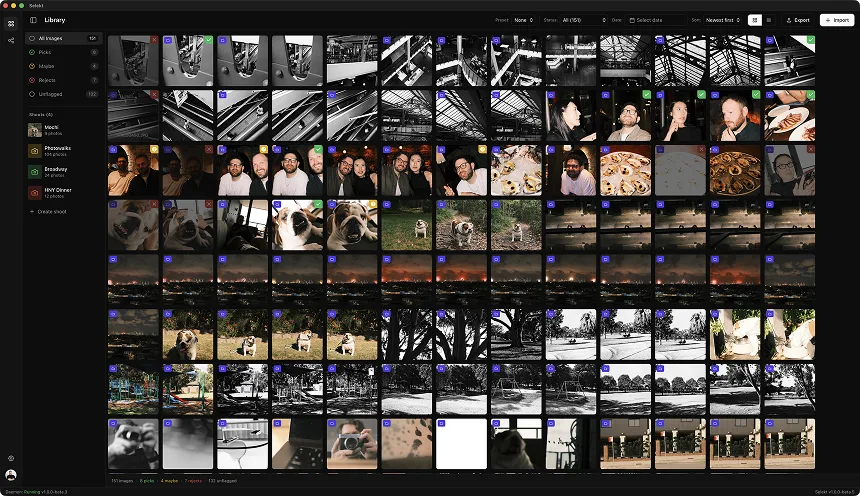
School photography is a volume game. One normal day can mean individual portraits, sibling photos, classroom groups, staff shots, and maybe sports or candids on top. By the time you get back to your desk, you're not looking at a tidy little portrait session - you're staring at thousands of frames where most differences are microscopic and every delay compounds across the whole job.
That is exactly why school photographers need a culling workflow, not just a culling app. The goal is not to admire every frame. The goal is to move from capture to sellable, deliverable selects without drowning in duplicates, near-duplicates, and admin drag. Here's the workflow that actually makes the volume survivable.
Why school photography is a different kind of culling problem
Wedding photographers deal with emotion. Sports photographers deal with peak action. School photographers deal with repetition. That's the brutal part. You're making the same decision structure hundreds or thousands of times:
- Is this the sharp one?
- Are the eyes open?
- Is the expression usable?
- Is the posture slightly less awkward than the previous frame?
- Is this the one parents will actually buy?
On a single student you might only have 3-10 frames. That sounds easy until you multiply it by 400 students. Suddenly you're not culling a portrait session - you're running a production line. The winning workflow is the one that keeps context intact and reduces each decision to the smallest possible unit.
Step 1: split the job into natural scenes immediately
The first mistake is treating the whole card like one giant shoot. School coverage has obvious scene boundaries that should become culling boundaries:
- individual portraits
- sibling sets
- class groups
- staff portraits
- sports add-ons
- candid or campus coverage
Inside those categories, each student or group is effectively its own mini-scene. That matters because the culling question is never 'what are the best 300 images on this card?' It's 'what is the best frame of this student, then the next student, then the next one?'
A scene-based tool like Selekt helps because it turns one impossible wall of images into hundreds of tiny decisions. That's the whole trick. Reduce the scope until the right answer is obvious.
Step 2: do the fast rejection pass first
Your first pass should be brutally mechanical. This is not where you finesse anything. You're just clearing obvious junk:
- blinks
- motion blur
- missed focus
- bad posture
- weird half-expressions
- duplicates where one frame is clearly stronger
School photography rewards decisiveness. If two frames are similar and one is even slightly better, kill the weaker one and move on. You do not get paid extra for maintaining emotional relationships with backups.
The fastest way through this pass is keyboard-only culling. Arrow through the scene, pick or reject, then jump to the next scene. If you touch the mouse constantly, you're dead. The friction sounds small, but repeated 2,000 times it becomes the whole day.
Step 3: compare within the student, not across the whole shoot
This is where a lot of photographers lose time. They keep too much because they don't trust the comparison. Side-by-side comparison fixes that.
For each student or sibling group, you're usually choosing between a handful of nearly identical frames. Put them next to each other and the answer gets embarrassingly obvious:
- one frame has cleaner eye contact
- one has the better smile
- one has the straighter shoulders
- one is just a touch sharper
Trying to hold those differences in your head while flipping one image at a time is stupidly inefficient. School work has too many near-duplicates for memory-based judging. Compare, choose, move on.
Step 4: separate operational keeps from true selects
Keeper definitions are contract and sales-workflow questions; treat these as examples.
School photography often has two different definitions of 'keeper':
- the best frame you'd actually want to deliver or sell
- the backup frame you might need because of admin, ordering, or parent preference
Those are not the same thing. The solution is to keep your primary selects clean, then retain only minimal backups where they are operationally useful - not emotionally reassuring. A backup matters when the expression is materially different or when a parent might reasonably want another option. It does not matter when it's basically the same photo with one eyebrow behaving differently.
This distinction is where volume photographers save enormous time downstream. Cleaner selects mean faster proofing, faster export, less indecision, and less mess when you have to locate a file later.
What school photographers actually care about
Operational priorities vary by school and ordering workflow.
The outside world talks about AI and editing styles. School photographers usually care about something simpler and more ruthless:
- speed
- consistency
- not missing a kid
- getting through the backlog without hating life
That lines up with the signals still showing up in photographer communities. When people talk about Photo Mechanic, FastRawViewer, or Lightroom workarounds, they're really talking about one thing: how fast can I make safe, repeatable keep/reject decisions at volume?
That is good news for Selekt, because the product does not need to pretend school photography is glamorous. It just needs to make the production reality faster and cleaner.
A practical benchmark
Illustrative time boxes, not expected performance benchmarks.
For a typical school day, a sane target looks something like this:
- 500-1,000 portrait frames: first-pass cull in 20-35 minutes
- 2,000-3,000 mixed frames: first-pass cull in 45-75 minutes
- full multi-segment day: break into batches and finish in 2-3 focused sessions, not one miserable marathon
If your workflow takes dramatically longer, the problem is usually not your judgment. It's structure. You're spending too much time rebuilding context, comparing mentally instead of visually, or scrolling through a flat timeline that should have been split into scenes.
The bottom line
School photography culling is not an art-gallery problem. It's an operations problem with creative consequences. The photographers who stay sane are the ones who reduce each choice to the smallest possible decision: this student, this mini-sequence, this best frame.
That is why scene-based culling works so well here. It respects the actual job shape instead of pretending every shoot should be handled like one giant Lightroom strip. Selekt gives you the speed of a keyboard-first culling workflow with scene grouping and side-by-side comparison, which is exactly what high-volume school jobs need.
If your current process feels like death by a thousand thumbnails, that's not you being weak. That's the workflow being wrong.