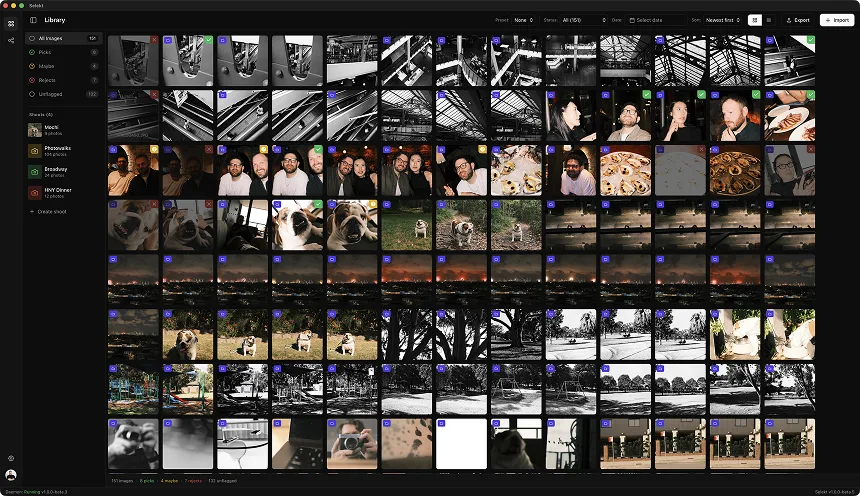
Short answer: yes, you can cull for free in 2026, including with AI help. Selekt has a permanent free plan with unlimited culling and export plus on-device focus, exposure, and blur scoring on Mac and Windows. FilterPixel and Imagen give you a few free projects. Adobe Bridge, digiKam, and darktable are free without AI help, and XnView MP and FastStone are free for personal use. Aftershoot, Narrative, Photo Mechanic, PhotoCuller, and Excire offer trials, not free plans.
We make Selekt, so weigh our summary of it accordingly. Every other tool below links to the vendor’s own page, checked on 26 September 2026. Plans change often, so confirm the current terms before you rely on one for paid work.
Free plans, free projects, and trials at a glance
| Tool | What is free | AI culling help | Platforms |
|---|---|---|---|
| Selekt | Permanent free plan: unlimited imports, culling, and export | On-device focus, exposure, and blur scoring; cloud AI for 100 photos a month | macOS, Windows |
| FilterPixel | 4 free projects; photo limits vary by culling mode | Yes, within those projects | macOS, Windows |
| Imagen | 2 free culling projects | Yes, within those projects | Desktop app |
| Optyx | Free tier with fast previews and ratings | Not on the free tier | macOS, Windows |
| Adobe Bridge | Free download | No | macOS, Windows |
| digiKam | Free and open source | No culling scores | Linux, macOS, Windows |
| darktable | Free and open source | No; side-by-side culling mode | Linux, macOS, Windows |
| XnView MP | Free for private, educational, and nonprofit use | No | Linux, macOS, Windows |
| FastStone Image Viewer | Free for personal and educational use | No | Windows |
Trials only: Aftershoot (30 days), Narrative (a trial of its top plan; its own pricing FAQ says it is not permanently free), Photo Mechanic (30 days), PhotoCuller (30 days), Excire Foto (14 days), and FastRawViewer (30 days). Lightroom’s Assisted Culling is included with a paid Lightroom plan, not free.
Selekt Free: AI help with no time limit
Selekt Free has no time or project limit. You can import, cull, and export as much as you like on macOS or Windows. With a free account you also get on-device focus, exposure, and blur scoring, genre profiles for weddings, portraits, sports, and events, and groups for bursts, similar frames, and duplicates. None of that uses your cloud allowance.
Cloud AI adds face detection for closed-eye flags and Close-ups, plus searchable tags. Free covers 100 photos a month, enough to try it on a small shoot but not on a full wedding. Pro makes cloud AI unlimited for everyday shooting and costs A$16 a month (about US$11).
Honest limits: Selekt marks picks, maybes, and rejects rather than offering separate star ratings; its XMP export maps them to star ratings and colour labels for Lightroom Classic, Capture One, and Bridge. If a photo already has an XMP sidecar, Selekt leaves it untouched instead of merging into it. The Windows installer is not code-signed yet, so SmartScreen may show a warning the first time you install it.
Free projects: FilterPixel and Imagen
FilterPixel offers four free projects with no credit card. Its current pricing guide describes one DeepCull project of up to 5,500 photos and three basic culling projects with a combined 10,000-photo allowance. It proposes a selection with AI, then you review and override it. After the free projects, paid plans start at US$14.99 a month billed annually. Four projects is enough to judge it on real jobs, but not a long-term free workflow.
Imagen gives you two free culling projects, and its AI culling is otherwise a paid add-on to its editing platform. Prices vary by country, so check what Imagen shows you.
Free tools without AI help
Adobe Bridge is a free download from Adobe. It shows previews, filters, star ratings, colour labels, and keywords, and it writes XMP metadata that Lightroom Classic and Photoshop can read. It has no culling scores or grouping, so you judge every frame yourself.
digiKam is free and open source on Linux, macOS, and Windows. It is a full photo manager with tags, ratings, and labels, which suits photographers who want one free library rather than a quick first pass.
darktable is free and open source, and its lighttable includes a culling mode that shows frames side by side, with zoom to 100%. It is also a RAW editor, so it can take you from cull to finished file without leaving the app.
XnView MP is free for private, educational, and nonprofit use; a commercial licence costs about €29 per seat. FastStone Image Viewer is a fast full-screen viewer for Windows, free for personal and educational use. If you are paid for your photography, check each licence before you rely on it.
Optyx has a free tier with fast previews and ratings; its AI culling is part of the paid Pro plan.
Trials are not free plans
A trial is the fairest way to test a paid culler on your own shoots, but plan for the recurring cost afterwards. Aftershoot Select costs US$10 a month billed annually or US$15 month to month after its 30-day trial. Narrative’s Lite plan starts at US$10 a month billed annually. Photo Mechanic costs US$14.99 a month, US$149 a year, or US$299 once, and still has no AI culling. PhotoCuller is a one-time US$59 licence for Apple devices. Adobe’s Lightroom plan, which now includes Assisted Culling, costs US$11.99 a month on an annual contract.
If you already pay for Lightroom, try Assisted Culling first. If you do not want another subscription, compare the free plans above on the same shoot.
How to choose
- You want AI help without paying: Selekt Free, on Mac or Windows.
- You want AI to propose a selection on a few big jobs: FilterPixel’s free projects.
- You only need fast ratings and already use Adobe apps: Adobe Bridge.
- You work on Linux or want open source: darktable for culling and editing, or digiKam for a full library.
- You are on Windows and cull personal photos: FastStone Image Viewer.
Whichever you try, test the whole workflow on one representative shoot: mixed RAW and JPEG files, a burst, and the export into your editor. Check preview quality, keyboard rating, how similar frames are compared, what the metadata looks like in your editor, and what happens when a free allowance runs out. Keep your originals backed up and never delete from automated suggestions alone.
Sources and further reading
- Selekt pricing and plan details ↗
- FilterPixel: pricing and free projects ↗
- Imagen: AI culling ↗
- Optyx: plans ↗
- Adobe: Bridge ↗
- digiKam: about ↗
- darktable manual: culling mode ↗
- XnView MP: licence and download ↗
- FastStone Image Viewer ↗
- Narrative: plans and pricing FAQ ↗
- Aftershoot: pricing ↗
- Camera Bits: Photo Mechanic pricing and trial ↗
- PhotoCuller: pricing ↗
- Adobe: Lightroom 1 TB plan FAQ ↗