Fujifilm RAF culling workflow: taming X-Trans files
A practical guide to culling Fujifilm RAF files efficiently. Covers X-Trans sensor quirks, why some tools struggle with RAF, film simulation previews, and a workflow that keeps your culling fast without sacrificing Fuji colour.
Fujifilm shooters love their cameras. The colour science, the tactile controls, the film simulations that make JPEGs look like they came from a lab. But when it comes to post-production, Fuji files have a reputation: RAF files are weird, slow, and annoying to work with.
There's truth to that reputation, and there's a technical reason behind it. Understanding why RAF files behave differently from Canon CR3 or Nikon NEF files will help you build a culling workflow that plays to Fuji's strengths instead of fighting its quirks.
If you've ever watched your culling tool choke on a folder of X-T5 or X-H2S files while your friend's Canon R5 images fly through the same software, this post is for you.
Why RAF files are different
Most cameras use a Bayer colour filter array — a grid of red, green, and blue filters arranged in a repeating 2×2 pattern (RGGB) over the sensor. Every RAW processing tool on the planet is optimised for Bayer demosaicing. It's fast, well-understood, and GPU-accelerated in most modern software.
Fujifilm's X-Trans sensor uses a different pattern. Instead of the 2×2 Bayer grid, X-Trans uses a 6×6 repeating array with a more randomised distribution of colour filters. This design reduces moiré without an optical low-pass filter, which means sharper images straight off the sensor.
The trade-off: demosaicing X-Trans data requires a completely different algorithm. The standard Bayer interpolation can't be applied. X-Trans demosaicing (typically Markesteijn 3-pass or similar) is computationally heavier and less parallelisable on GPUs. In practical terms, rendering a full X-Trans RAW file takes 2-5× longer than rendering an equivalent Bayer RAW file.
This matters for culling because every time your software needs to show you a RAW preview, it's doing that demosaicing work. If your culler decodes the RAW data on the fly, Fuji files will always feel slower than Canon, Nikon, or Sony files of comparable resolution.
The embedded JPEG advantage
Here's the good news: every RAF file contains an embedded JPEG preview generated by the camera at capture time. This JPEG is created using whatever film simulation you had active — Classic Negative, Provia, Astia, whatever your in-camera setting was.
This embedded preview is your culling secret weapon. It loads in milliseconds regardless of the X-Trans complexity underneath, and it shows you the image with your chosen film simulation applied. For culling purposes — evaluating composition, expression, timing, and basic exposure — this embedded JPEG is more than sufficient.
Smart culling tools use the embedded JPEG for browsing speed and only decode the full RAW data when you explicitly request it (for a zoom-to-100% check, for example). This approach gives you the speed of JPEG culling with RAW files sitting behind each image ready for editing later.
If your current workflow involves waiting for full X-Trans RAW renders before you can even start flagging images, you're spending minutes on overhead that adds zero value to the culling decision.
Film simulations and culling decisions
Fujifilm shooters are uniquely positioned when it comes to JPEG culling, because Fuji's film simulations produce JPEGs that many photographers consider final or near-final quality.
This changes the culling dynamic. With most other camera brands, the embedded JPEG is a rough preview — the starting point before you apply your editing style. With Fuji, the embedded JPEG might be very close to your finished look. Classic Chrome, Eterna, Acros — these simulations have been refined over years and many Fuji shooters build their entire aesthetic around them.
The practical implication: when culling Fuji files, the embedded JPEG preview isn't just a proxy for the RAW data. It's a preview of your likely final output. This means your culling decisions can be more confident because what you're evaluating is closer to what you'll deliver.
Some Fuji photographers shoot JPEG-only for this reason, but most professionals shoot RAW+JPEG to preserve editing flexibility. If you shoot RAW+JPEG, your culling tool should pair the files automatically so you see one entry per shot with the JPEG loaded for speed and the RAF linked for later editing.
Which culling tools handle RAF well
Not all culling software handles Fujifilm RAF files equally. The differences come down to two things: how quickly the tool can display a usable preview, and how accurately it renders X-Trans data when you do need the full RAW.
Photo Mechanic is the speed benchmark. It reads the embedded JPEG preview and displays it instantly, regardless of the RAW format underneath. For RAF files, this means zero X-Trans decoding overhead during culling. The downside: when you toggle to the RAW render, Photo Mechanic relies on the system's RAW codec, which varies in quality for X-Trans.
Lightroom Classic fully decodes RAF files using Adobe's own X-Trans demosaicing. The quality is excellent, but the speed is not. Generating Standard or 1:1 previews for 2,000 RAF files takes noticeably longer than the same number of Bayer RAW files. If you cull inside Lightroom, the X-Trans penalty hits you at every step.
Capture One has historically been considered the gold standard for Fuji RAW processing, with tighter Fujifilm partnership and optimised X-Trans rendering. Culling in Capture One is faster than Lightroom for Fuji files, but it's still slower than a dedicated culler because it's doing full RAW decoding.
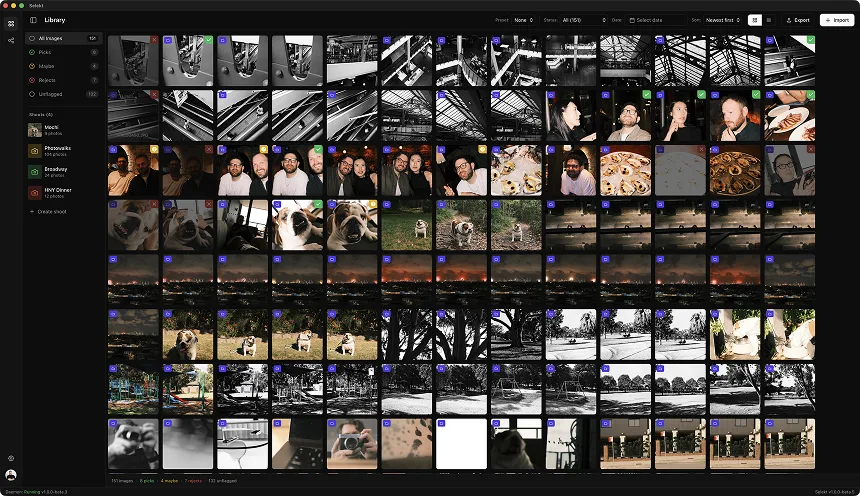
Selekt uses the embedded JPEG for browsing speed (instant previews regardless of format) and LibRaw for full X-Trans decoding when you press R to toggle to the RAW view. This hybrid approach means your culling speed is identical to any other camera brand — the X-Trans complexity only appears when you explicitly request the RAW render for a focus check or exposure evaluation.
The Fuji culling workflow
Here's a workflow specifically optimised for Fujifilm RAF files:
Before the shoot: Choose your film simulation deliberately. Since the embedded JPEG will be your culling preview, pick a simulation that represents your final look. Culling on Classic Negative previews when your final output will be heavily re-graded wastes the advantage of Fuji's in-camera processing.
Step 1: Dump cards to SSD. RAF files from newer Fuji cameras (X-T5, X-H2S, GFX 100S II) are 50-80MB each. A 2,000-shot wedding produces 100-160GB of data. Use your fastest SSD and a USB 3.2 or Thunderbolt card reader. CFexpress Type B from the X-H2S dumps significantly faster than SD from the X-T5.
Step 2: Open in your culling tool. Point your culler at the folder. If using a tool that reads embedded JPEGs, previews appear instantly. If using Lightroom, go make coffee while it generates previews.
Step 3: First pass on film simulation JPEGs. Cull at speed using the embedded previews. You're evaluating the image as your film simulation presents it — composition, moment, expression, overall feel. Flag or reject with keyboard shortcuts. Auto-advance between images. Target 1-2 seconds per image.
Step 4: RAW toggle on edge cases. For images where you're unsure about exposure recovery or want to check if highlight detail exists in the RAW that the JPEG clipped, toggle to the full RAW view. On Fuji files, this takes a moment longer than Bayer RAW — that's normal. Only do this for maybe 5-10% of your images.
Step 5: Export picks with metadata. Send your selections to Lightroom, Capture One, or your editor of choice via XMP sidecars or folder export. Your editor now imports only your selects and generates full-quality X-Trans renders for just the images you'll actually edit.
RAW+JPEG pairing for Fuji shooters
If you shoot RAW+JPEG on your Fuji (which most serious Fuji photographers do), you'll have two files per shot: IMG_1234.RAF and IMG_1234.JPG. That's twice the files to manage.
A good culling tool detects these pairs automatically and shows you one thumbnail per shot. You see the JPEG for speed; the RAF is linked behind it. When you flag the image as a pick, both files come along.
This pairing is especially valuable for Fuji because the JPEG carries your film simulation while the RAF carries the full sensor data. During culling, you browse the simulation-processed JPEG. During editing, your editor works with the RAF. Best of both worlds.
One thing to watch: some Fuji cameras let you set different image sizes for JPEG and RAW. Make sure both are set to the same resolution for proper pairing. And if you use the in-camera RAW conversion feature to produce additional JPEGs with different simulations, those extra files can confuse pairing logic in some tools.
Common Fuji culling mistakes
Waiting for full RAW renders before culling. This is the biggest time sink. X-Trans decoding is slow. If your tool forces full RAW rendering for every preview, you're paying the X-Trans tax on every single image, including the 50% you're going to reject. Use embedded JPEGs for the first pass.
Culling in Lightroom with Smart Previews. Lightroom's Smart Preview feature generates smaller DNG files for offline editing. Some photographers build Smart Previews for their entire import thinking it'll speed up culling. It doesn't — it just adds another processing step before you start. The embedded JPEG in the RAF file is faster and already exists.
Ignoring the film simulation preview. Some photographers reflexively distrust JPEG previews because on Canon or Nikon they look flat and unrepresentative. Fuji's film simulations are different. The embedded JPEG is often a genuinely good representation of the final output. Trust it for culling.
Pixel-peeping X-Trans at 100% during first pass. X-Trans rendering at 100% can show subtle artefacts depending on the demosaicing algorithm — the so-called "waxy" or "watercolour" look in fine detail that plagued older versions of Lightroom. Modern tools handle this much better, but if you're zooming to 100% on every image looking for demosaicing artefacts, you're wasting your first-pass time on a problem that only matters for large prints of your final selects.
Not shooting RAW+JPEG. Some Fuji shooters go RAW-only to save card space. On modern high-capacity cards, the JPEG adds maybe 10-15% to your total storage. The culling speed benefit of having instant JPEG previews more than justifies the space. Always shoot RAW+JPEG on Fuji.
X-Trans III vs X-Trans IV vs X-Trans V: does generation matter?
Fujifilm has iterated on the X-Trans sensor across several generations. For culling, the main differences are resolution and file size:
X-Trans III (X-T3, X-T30, X-Pro3): 26MP, RAF files around 50-55MB compressed. These are the most widely supported in culling tools and the fastest to process.
X-Trans IV (X-T4, X-T30 II, X-S10): Similar resolution and file characteristics to X-Trans III. Minimal difference in culling speed.
X-Trans V (X-T5, X-H2S at 26MP mode): Same resolution but newer processing pipeline. RAF files may be slightly larger. Well-supported in current tools.
X-Trans V 40MP (X-H2, X-T5 in 40MP mode): Significantly larger files at 70-80MB. The higher resolution means more data to process, and X-Trans demosaicing scales roughly linearly with pixel count. Culling 40MP Fuji files from the full RAW is measurably slower than 26MP. This makes the embedded JPEG approach even more important for 40MP Fuji shooters.
GFX (medium format): GFX sensors use a standard Bayer array, not X-Trans. If you're shooting GFX, the X-Trans considerations in this article don't apply — your culling speed will be comparable to other Bayer cameras at similar resolution.
For practical culling, the generation matters less than the resolution. Use embedded JPEGs for browsing regardless of which X-Trans generation you're on.
Getting the most out of Fuji files
Fujifilm cameras reward photographers who understand the pipeline. The in-camera processing is genuinely exceptional — arguably the best in the industry. Your culling workflow should leverage that rather than fighting it.
Set your film simulation with intention. Think of it as a culling aid as much as a creative choice. Classic Chrome for documentary work. Astia for portraits. Acros for black and white. When your embedded JPEG already reflects your creative vision, culling becomes easier because you're evaluating the finished look, not imagining what the image could become with editing.
Shoot RAW+JPEG. Always. The speed benefit during culling is worth the minor storage cost.
Use a culling tool that respects the embedded preview. If your tool forces full X-Trans decoding for every thumbnail, you're spending time on processing that doesn't help you make better culling decisions.
Save your RAW toggle for the moments it matters: checking highlight recovery in a backlit portrait, evaluating shadow noise in a reception shot, verifying sharpness on your hero images. The other 90% of your culling decisions can happen at JPEG speed.
Fuji's colour science is your competitive advantage. Don't let the X-Trans processing overhead turn it into a bottleneck. Cull smart, cull fast, and let the beautiful files do their thing in editing where the quality actually matters.
Related
Ready to speed up your culling?
Selekt is a free photo culling app for macOS & Windows with keyboard shortcuts, AI tagging, and Lightroom export.
Download free