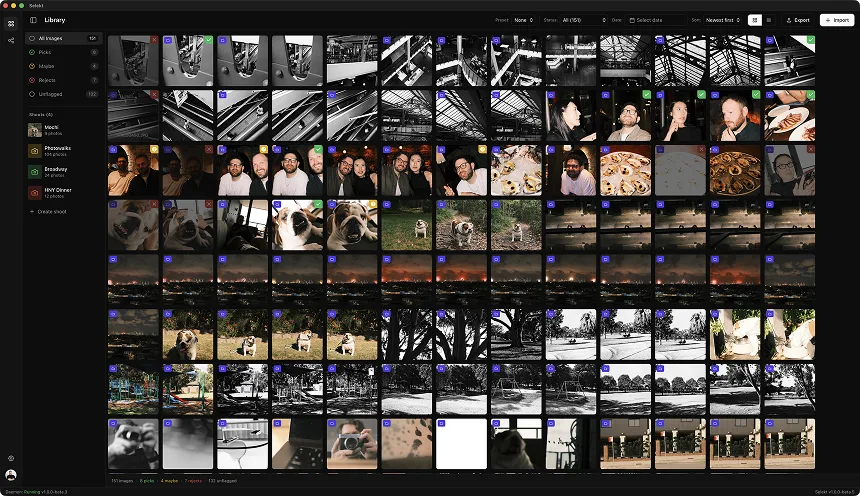
Scene-based culling breaks a large shoot into smaller comparison contexts: a burst, setup, room, speaker, product, or part of an event. The benefit comes from comparing relevant frames together. A scene boundary is an organisational aid, not proof that every image inside it is visually similar or that client coverage is complete.
Choose boundaries that match the job
For portraits, group by person, pose, outfit, or lighting setup. For events, use programme phases and speakers. For products and property work, use the shot list, SKU, or room. For sports, bursts and plays may be more useful than broad time blocks. Time gaps can suggest a split, but they need review.
Automatic and manual groups
Tools use different terms and signals for bursts, duplicates, similar images, scenes, and collections. Selekt supports manual scenes plus automatic organisation and related-frame groups. Inspect the visible result and adjust it when a reshoot or rapid location change crosses the suggested boundary. Do not describe every automatic group as AI-generated without checking the current feature.
Cull within a group, then across the set
Remove clear failures, compare expression and timing, and choose the frame or small sequence that fulfils the purpose of the group. Then zoom back out for client coverage, pacing, visual variety, and repeated compositions across groups. Unique required frames can matter more than the technically strongest member of a cluster.
Evaluate the method
Try the same representative shoot with and without grouping. Measure total active time, grouping corrections, missed coverage, and confidence in close comparisons. The result depends on how well the boundaries match your work; broad claims about fixed percentage savings are not evidence for a particular photographer.