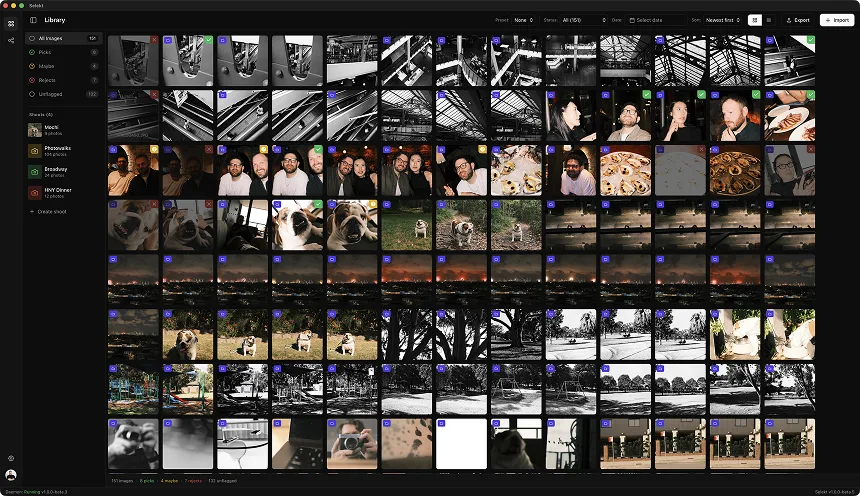
Illustrative session example: frame volume varies widely with the animal and shooting style.
Your subject just did something adorable. You held down the shutter. Now you have 47 frames from that 3-second burst, and the dog has already moved on to sniffing something in the corner.
Pet photography generates a staggering number of frames for a simple reason: animals don't take direction. You can't ask a golden retriever to hold that perfect head tilt for two more seconds. You shoot in bursts, hoping to catch the magic moment somewhere in the sequence.
The result? A 90-minute pet session can produce 800-1500 images. Most of them are near-misses: eyes closed, tongue at an awkward angle, blur from sudden movement, or that split-second before the perfect expression.
Here's how to cull efficiently without losing the shots that make pet owners tear up.
Why pet photography culling is different
Workflow examples, not universal burst sizes or outcomes.
Pet photography has unique characteristics that demand a specific culling approach:
Burst sequences are your raw material. Unlike portrait sessions where you might take 5-10 frames per pose, pet work often means 20-50 frame bursts trying to catch one good expression. Your culling is less "choose the best version" and more "find the usable frame in this sequence."
Eye contact is everything. A pet looking directly at the camera with bright, engaged eyes is the money shot. The same pet looking slightly off-camera, mid-blink, or with glazed "treat trance" eyes is a reject. This distinction drives most of your culling decisions.
Movement blur is relentless. Dogs especially are in constant micro-motion. Even when they're "sitting," there's ear twitching, tail wagging, head turning. You'll reject more frames for motion blur in pet work than in almost any other genre.
Expression windows are milliseconds. The perfect "smile," perked ears, or curious head tilt lasts for a fraction of a second. Your keeper might be frame 23 of 47, surrounded by unusable shots on either side.
Multiple subjects multiply complexity. Two dogs looking at the camera simultaneously? Both with good expressions? Both in focus? The odds drop exponentially. Multi-pet shots require patient culling through many near-misses.
Step 1: organize by sequence or setup
Before culling, get your organizational structure right. Pet sessions typically break down into:
Action sequences: Running, jumping, catching, playing. These are pure burst work - you're hunting for the peak moment.
Portrait setups: Posed shots where you're trying to get attention and expression. Multiple shorter bursts per setup.
Candid moments: The in-between shots where the pet relaxes and shows personality. Often your best emotional content.
Pet + owner combinations: The hardest shots - both human and animal need to look good simultaneously.
Multi-pet frames: When you're trying to get 2+ animals cooperating in the same frame.
Group by natural breaks: Time gaps between sequences (when you repositioned, changed toys, moved locations) create natural groupings. Process each group as a unit rather than scrolling through 1000 images linearly.
Use your shot notes: If you mentally tagged "this is the jump sequence" or "this is the sunset backlight setup," those mental boundaries help you cull with context.
Step 2: the rapid rejection pass
Review prompts, not fixed sub-second targets.
First pass: clear the obvious failures. Move fast - this is about reducing volume, not making selections.
Immediate rejects (less than 1 second per frame):
- Eyes closed or mid-blink
- Looking away from camera (unless intentional profile shot)
- Motion blur on face/eyes
- Out of focus (wrong focal plane)
- Tongue awkwardly positioned (half out, caught mid-lick)
- Ears in unflattering position (one up, one back)
- Obvious exposure failures
- Distracting elements in frame (leash in bad position, handler's hand visible)
- Caught mid-yawn (unless it's really good)
- Tail blur obscuring the composition
What survives to consideration:
- Sharp eyes
- Looking at camera (or intentional away-look)
- Pleasant expression
- Good ear position
- Clean composition
Target: reduce burst sequences to 3-5 candidates each.
In a 40-frame burst, you might reject 35 instantly. Eyes closed, movement, wrong moment. That's normal. You're hunting for the 5 frames where everything aligned.
Step 3: the eye contact hierarchy
Once you've eliminated technical failures, eye quality becomes your primary filter.
Tier 1: Direct, engaged eye contact
- Both eyes sharp and visible
- Pupil visible (not caught mid-blink)
- Bright, alert expression in the eyes
- "Catchlight" visible (reflection of light source in eye)
- This is your target for hero shots
Tier 2: Soft eye contact
- Looking at camera but relaxed/dreamy expression
- Good for emotional, calm moments
- Works well for senior pet portraits
Tier 3: Near-miss eye contact
- Looking slightly off-camera
- One eye sharper than the other
- Usable if expression is exceptional
Tier 4: Intentional away-looks
- Profile shots, looking into distance
- Can be powerful but shouldn't dominate gallery
- Need exceptional composition to justify
Catchlight check: In darker or diffused lighting, check for catchlight presence. Eyes without catchlight often look "dead" or flat. Prioritize frames where you caught that little sparkle.
The treat-trance problem: Dogs in "treat focus" mode often have a specific intense, almost uncomfortable look. It's technically sharp and directed, but emotionally reads as desperate rather than engaging. Deprioritize these for more relaxed eye contact frames.
Step 4: expression selection
With eye contact established, expression becomes the differentiator:
Dog expressions to prioritize:
- "Smile" (relaxed open mouth, tongue visible)
- Curious head tilt
- Alert, ears-forward attention
- Relaxed contentment (soft eyes, calm posture)
- Playful engagement
Dog expressions to deprioritize:
- Tongue fully extended (can look panting/hot)
- Lip caught on teeth (unflattering)
- Flews (lip folds) in awkward position
- Stress signals (whale eye, tight mouth, ears back)
- Drowsy/disengaged (unless senior pet aesthetic)
Cat expressions to prioritize:
- Slow blink (the cat "I love you")
- Alert curiosity (ears forward, focused)
- Relaxed contentment
- Regal dignity
Cat expressions to deprioritize:
- Mid-meow (awkward mouth position)
- Startled/wide-eyed (can look scared)
- Ears back (aggression/fear signal)
- Caught mid-grooming
Know the breed: Different breeds have different "best" expressions. Pugs look great with slight head tilts. Huskies shine with dramatic expressions. Cats have the slow-blink magic. Learn what makes each animal look their best.
Handling the burst sequence cull
Pet photography lives and dies in burst sequences. Here's how to cull them efficiently:
The bracket approach:
- Scan the full burst quickly to identify the general "peak" zone (where the action happened)
- Narrow to a 10-15 frame window around the peak
- Compare frame-by-frame within that window
- Select 1-3 frames maximum from the sequence
The backwards scan: Often, the best frame is 2-3 frames before you stopped shooting. You typically stop when the moment passes, which means the peak was just before that. Start your detailed comparison from the end of the burst, working backwards.
The expression wave: In a typical burst, expression quality waves up and down. The dog's ears go up... then relax... then perk again. Identify the peaks in this wave rather than comparing every frame.
Multi-frame compositing consideration: For action sequences, you might keep 2-3 frames showing progression (jump start, peak, landing). For portrait bursts, you usually only need the single best frame.
Don't keep the runner-ups. If frame 23 is clearly best, you don't also need frames 21 and 25. They look almost identical and just make the client's selection harder.
Multi-pet shot culling
Illustrative comparison only: usable-frame rates are not predictable from the number of animals.
When you're photographing multiple animals together, your rejection rate skyrockets. Here's the math:
One pet: 1 in 10 frames might be usable (both eyes, good expression, sharp). Two pets: 1 in 50+ frames might have both animals looking good. Three+ pets: You're looking for unicorns.
The multi-pet culling strategy:
First filter: Is ANY pet unusable? Scan for obvious failures - any pet with closed eyes, blur, bad expression. Reject the frame.
Second filter: Are ALL pets acceptable? For remaining frames, each animal needs to meet minimum bar. Not perfect - just acceptable.
Third filter: Find the magic frame. Among the survivors, look for the rare shot where everything aligned. Both/all pets engaged, good expressions, sharp eyes.
Composite backup plan: If you never got the perfect multi-pet frame, flag your best shots of each individual pet positioned consistently. A skilled editor can sometimes composite them. (Note this isn't ideal, but it's a safety net.)
Be honest about yield: A 2-hour multi-pet session might produce only 3-5 frames where all animals cooperated. That's normal. Don't lower your standards to fill the gallery - deliver fewer, better shots.
Pet + owner combinations
The hardest shots to cull: both human AND animal need to work.
Filter order:
- Is the pet sharp and looking good?
- Is the human's expression natural?
- Is there visible connection/interaction?
- Are both in focus?
Why pet-first filtering: It's easier to get a good human expression than a good pet expression. The pet is the variable. If the pet isn't working in the frame, the human's expression doesn't matter.
Connection markers: Look for frames where the pet and human are clearly interacting:
- Pet looking at owner (devotion shot)
- Owner looking at pet (adoration shot)
- Both looking at camera (classic portrait)
- Pet leaning into human (affection)
- Caught mid-play or mid-laugh (candid energy)
The awkward hold: Sometimes humans hold their pets awkwardly when posing. Arms too rigid, grip too tight, forced positioning. These frames read as unnatural even if both subjects look technically fine. Prioritize frames where the hold looks relaxed and natural.
Kids + pets: Triple the chaos. Kids move, pets move, timing is impossible. Lower your per-frame standards and focus on genuine interaction moments. The technically imperfect shot with real emotion beats the sharp, sterile one.
Motion and action shots
Action sequences have their own culling logic:
What you're looking for:
- Peak of action (highest point of jump, full extension of run)
- All four paws visible (satisfying composition)
- Face sharp (body blur is acceptable for motion)
- Dynamic posture (not caught awkwardly mid-stride)
Acceptable motion blur:
- Legs/paws: Blur can convey speed
- Ears/tail: Adds dynamic feeling
- Background: Panning blur is intentional style
Unacceptable motion blur:
- Face: Always needs to be sharp
- Eyes: Critical sharpness point
- Overall softness: Means shutter speed was too slow
The 3-frame action selection: For a jump or catch sequence, consider selecting:
- The approach/anticipation frame
- The peak action frame
- The landing/resolution frame
This tells a story. But one perfect peak-action frame is often better than three mediocre frames.
Panning shot culling: If you panned with a running dog, look for:
- Subject sharp, background blurred
- Face towards camera
- Dynamic leg position
- No distracting elements crossing the motion blur streaks
Delivery benchmarks
Illustrative planning ranges, not industry benchmarks.
| Session Type | Duration | Frames Shot | Gallery Size | Cull Time Target |
|---|---|---|---|---|
| Mini session | 20-30 min | 150-300 | 10-20 images | 20-30 min |
| Standard portrait | 60-90 min | 400-800 | 25-40 images | 45-75 min |
| Full lifestyle | 2-3 hours | 800-1500 | 50-80 images | 90-120 min |
| Multi-pet session | 60-90 min | 500-1000 | 20-35 images | 60-90 min |
| Pet + family | 90-120 min | 600-1200 | 40-60 images | 75-100 min |
Gallery composition guidelines:
- Hero portraits (direct eye contact): 30-40%
- Action/play shots: 20-30%
- Candid/personality moments: 20-30%
- Pet + owner/family: 10-20%
- Detail shots (paws, nose, etc.): 5-10%
Don't over-deliver action: Pet owners primarily want to see their pet's face and personality. A gallery that's 70% running shots misses the point, even if the action is impressive.
Common pet photography culling mistakes
Keeping all the "technically good" shots. Technical quality isn't enough. A sharp image of a dog looking slightly off-camera with a neutral expression isn't a keeper. Prioritize connection over clarity.
Over-valuing action. Yes, the mid-air catch was impressive to photograph. But if 40% of your gallery is action shots, you've forgotten that pet portraits are about personality, not athletics.
Ignoring body language. Dogs and cats communicate stress, discomfort, and anxiety through body language. Ears back, whale eye, tense posture - these aren't keeper expressions, even if the technical execution is good. Owners may not consciously read the signals, but the photos will "feel" wrong.
Treating all pets the same. A golden retriever's "best expression" is different from a husky's, which is different from a cat's. Know what makes each animal look their best.
Keeping near-identical frames. If you have 5 frames of the same pose with subtle variations, the client doesn't need all 5. Pick the best one or two.
Missing the quiet moments. The in-between shots - the pet relaxing between setups, the gentle interaction with the owner - are often more emotionally resonant than the "posed" frames. Don't cull too aggressively in these sections.
Forgetting variety. Scan your final selections as a set. Do you have close-ups and full-body? Action and stillness? Solo and with humans? A good gallery tells a complete story.
Speed without sacrificing quality
Workflow suggestion: measure input methods on your own setup.
Keyboard workflow: Navigation and marking should be single keystrokes. Arrow keys to move, one key to pick, one to reject. Mouse usage kills speed when you're processing 800+ frames.
Two-pass discipline: First pass is rejection only (clear the failures). Second pass is selection (pick the winners). Don't mix these mental modes.
Burst-block culling: Process each burst sequence as a unit. Find the peak, select 1-2 frames, move on. Don't scatter your attention across the full timeline.
Set a timer for hard decisions: If you've been comparing 4 frames for more than 60 seconds, you're overthinking. The client won't see the difference - pick one and move.
Trust your shooting instincts: If you consistently get your best frame 3-5 frames into a burst (test, adjust, nail it), start your comparisons there. Use your patterns.
Compare at selection, not rejection: When rejecting, you can scan at thumbnail size. When selecting between finalists, zoom to check eye sharpness and expression nuance.
Take breaks: Pet culling is high-volume and can cause decision fatigue. After 300-400 images, take 5 minutes. Your quality decisions will improve.
The final variety check
Before calling the cull complete, scan your selections as a gallery:
Do you have variety in:
- Composition (close-up, medium, full-body)
- Expression (playful, serene, curious, alert)
- Context (posed, candid, action, quiet)
- Framing (horizontal, vertical, different backgrounds)
- Energy level (high energy play, calm portraits)
Do you have the must-haves:
- At least one "perfect portrait" (eye contact, great expression)
- At least one action/personality shot
- At least one pet + owner moment (if applicable)
- At least one detail shot if relevant (paws, nose, etc.)
Does the gallery tell a story? The best pet galleries feel like a complete session story, not a disconnected collection of shots. Check that your selections flow together.
Did you include the unexpected? Sometimes the frame that breaks the "rules" (slightly off-focus, unconventional composition) captures something magical. Don't cull so mechanically that you lose the surprises.
The goal isn't a gallery of technically perfect images. It's a gallery that makes pet owners see their animal's personality and feel the love they have for them. Cull for emotion, not just quality.