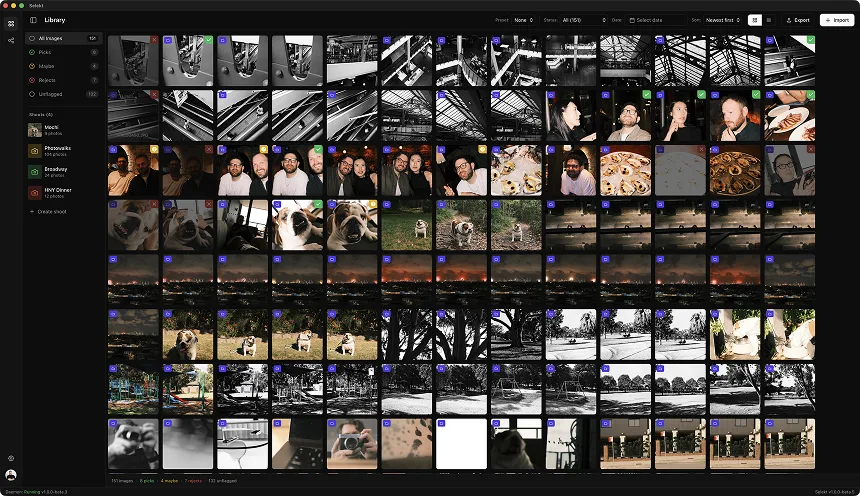
Illustrative session example; frame counts and similarity vary by photographer.
You just finished a portrait session. Maybe a headshot client, a family, a senior, or a personal branding shoot. Your card has 200-400 frames, and at first glance, about 80% of them look... basically identical. Same pose, same lighting, same composition - the differences are subtle. A slightly better smile. Eyes a fraction more engaged. Shoulders a millimeter more relaxed.
This is the portrait photographer's culling problem. Unlike weddings or events where you're chasing moments, portrait culling is about finding the single best version of a deliberately repeated setup. The volume is lower but the precision required is higher. Your client will examine every delivered image at full size, judging their own face in each one.
Here's a workflow that gets you from 300 near-identical frames to a tight, confident delivery without second-guessing yourself.
Why portrait culling is different
Portrait sessions have a unique culling challenge: controlled repetition.
In a wedding, each moment is different - the first look, the ceremony, the reception. You're scanning for peak moments in a stream of varied content. Your brain gets natural context shifts that help you evaluate quickly.
In a portrait session, you might shoot the same setup 15 times. Same pose, same framing, same light. The differences between frames are measured in micro-expressions, subtle shifts in eye direction, and tiny posture adjustments. Your brain struggles to hold these differences in working memory when flipping through images one at a time.
The core challenge: When every frame looks 90% the same, how do you reliably identify the 10% difference that makes one frame the winner?
The answer is comparison-based culling instead of sequential evaluation. You need to see options side by side, not one at a time.
Step 1: organize by setup, not by timestamp
Portrait sessions have natural groupings that chronological sorting doesn't capture:
- Different backgrounds (white seamless, gray, location change)
- Different lighting setups (main light position, fill ratios)
- Different poses (standing, seated, various angles)
- Different outfits (for branding or senior sessions)
- Different people (for family or group sessions)
Before you start culling, organize your images into these logical groups. In Selekt, Auto-organize splits scenes at a time gap you choose (1, 5, 15, or 30 minutes), so a longer pause, such as an outfit or location change, often becomes a scene boundary. Short pauses within a setup will not, so create or adjust scenes by hand where you want standing and seated shots apart.
This transforms the problem. Instead of scrolling through 300 images trying to remember which setup you're looking at, you're working through 10-15 scenes of 20-30 frames each. Each scene is one setup, one decision context.
Step 2: the technical rejection pass
Technical review prompts, not universal rejection rules.
First pass is fast and mechanical. You're not judging expressions yet - you're eliminating frames that can't be saved:
Immediate rejects:
- Missed focus (eyes must be tack sharp for portraits)
- Blinks or half-blinks
- Caught mid-word or mid-transition
- Unflattering shadows from subject movement
- Camera shake or motion blur
- Lighting misfires (strobe didn't fire, wrong exposure)
Keep for now:
- Slightly imperfect expression (might be the sharpest frame)
- Minor posture issues (might be the best face)
- Small technical issues that are fixable (color cast, slight underexposure)
This pass should take 1-2 seconds per image. You're making binary technical calls, not artistic judgments. If the eyes are soft, it doesn't matter how good the expression is.
Target: Eliminate 30-50% of frames in this pass. You should finish with roughly half your original count.
Step 3: expression evaluation within each setup
Now the real portrait culling begins. For each setup/scene, you're finding the best expression(s).
What makes a winning portrait expression:
- Eyes engaged - connection with the camera, not vacant or looking away
- Natural smile - if smiling, it reaches the eyes. No forced grins
- Relaxed face - jaw not clenched, forehead not tense
- Confidence - the subtle difference between looking at the camera and owning the frame
- Authentic to the person - the expression that looks like them, not a mask
The comparison technique:
For each setup, narrow down to your top 3-5 candidates, then compare them side by side. In Selekt, select multiple images and view them in comparison mode. The differences that were invisible when flipping through one at a time become obvious when you see them adjacent.
Check specifically:
- Eyes first - which frame has the most engaged, alive eyes?
- Smile quality - if smiling, which one looks most genuine?
- Overall energy - which frame has the best presence?
Pick ONE winner per setup. Maybe two if there are genuinely different expressions worth delivering (a serious and a smiling version). If you're keeping more than that, you're deferring decisions, not making them.
Step 4: the full-face inspection
Portrait clients examine their own faces ruthlessly. Before finalizing a pick, zoom to 100% and check:
Eyes:
- Sharp focus on the near eye (critical)
- Catchlights positioned well
- No red-eye or odd reflections
- Eyes open evenly (watch for one eye slightly more closed)
Skin:
- No unflattering shadows in eye sockets
- Chin shadow appropriate (not too harsh, not double-chin inducing)
- Expression lines that flatter vs. ones that don't
Hair:
- Flyaways that are easy vs. painful to retouch
- Hair falling naturally vs. awkwardly
Posture details:
- Shoulder position creating good lines
- Neck length appropriate
- Nothing pinched or compressed awkwardly
This pass catches issues that looked fine at fit-to-screen but fall apart at 100%. A frame that looked great might have a bizarre flyaway shadow across the forehead. The second-best expression might actually be the better deliverable.
Step 5: variety check across the session
After selecting winners from each setup, step back and look at the full set. A good portrait delivery has:
Expression variety:
- Serious/professional options
- Smiling/approachable options
- Candid/natural moments (if any)
Composition variety:
- Headshots (tight crop)
- Three-quarter or environmental shots (looser framing)
- Different angles if you shot them
Background variety:
- Different backdrops or locations if available
- Some variety in lighting mood
If your entire selection is smiling headshots on white, consider whether any of the rejected setups had a winner worth including for variety. Clients often appreciate options they didn't know they wanted.
Coverage check for groups: If shooting families or teams, verify every person appears at their best in at least one frame. The group shot where dad looks great but mom blinked isn't usable.
Delivery benchmarks
Illustrative delivery ranges, not industry standards.
How many portraits should you deliver? Industry standards by session type:
| Session Type | Typical Frames Shot | Typical Delivery |
|---|---|---|
| Corporate headshot | 50-100 | 3-8 finals |
| Personal branding | 150-300 | 25-50 finals |
| Senior portraits | 200-400 | 30-60 finals |
| Family session | 200-400 | 30-50 finals |
| Couples | 150-300 | 25-40 finals |
| Actor headshots | 100-200 | 5-15 finals |
Culling time targets:
- Corporate headshot (100 frames → 5 selects): 10-15 minutes
- Personal branding (250 frames → 40 selects): 25-35 minutes
- Senior/family (350 frames → 50 selects): 30-45 minutes
If you're taking longer, you're probably:
- Not using comparison view for similar frames
- Zooming to 100% on every image instead of selected candidates
- Keeping too many "maybe" frames instead of deciding
The near-duplicate trap
The biggest time sink in portrait culling is the "near-duplicate" decision paralysis. You have 8 frames of the same setup, and 3 of them look basically identical. Which one?
The solution: forced ranking
- Pull the 3 candidates into comparison view
- Eliminate the worst one immediately (there's always a clear third place)
- Now you have 2 frames. Look at eyes only. Which are more alive?
- If still tied, look at mouth/smile. Which is more genuine?
- If still tied, check technical details at 100% - sharpness, catchlights, flyaways
- Pick. Move on. Do not look back
The truth about near-duplicates: clients will never know which one you picked. They'll love the winner because it's good, not because it beat the runner-up by 2%. Your job is to deliver confident selections, not agonize over marginal differences.
The practical test: If you can't articulate why Frame A is better than Frame B, they're essentially the same quality. Pick either one. The hours you save across a year of sessions are worth more than the theoretical 1% improvement from longer deliberation.
Client preview considerations
Client review behaviour varies; use this as a conservative quality check.
Unlike wedding galleries where clients scroll through quickly, portrait clients study each image carefully. This affects your culling:
They will zoom to 100% on their own face. If you're delivering web resolution for preview, the issues you see at 100% on the RAW will show up at 100% on their screen. Don't deliver frames you wouldn't want examined closely.
They see their own asymmetries. Most people are hyper-aware of their "bad side," their under-eye circles, the shape of their nose. Even if you don't notice, they will. When in doubt between two frames, pick the one where the subject looks most like the version of themselves they want to see.
They compare delivered images against each other. If you deliver 5 headshots, they'll rank them. If one is noticeably weaker than the others, it hurts the overall perception of the gallery. Better to deliver 4 strong images than 4 strong + 1 decent.
Over-delivery creates decision fatigue. A client who receives 8 headshots and needs to pick 1 for LinkedIn will be more stressed than a client who receives 3 and picks 1. Fewer, stronger choices are a service, not a limitation.
Speed techniques for portrait culling
Workflow suggestion: compare input methods on your own setup.
Keyboard workflow: P to pick, X to reject, arrow keys to navigate, C or Enter to compare selected frames. Stay on the keyboard entirely. Mouse usage during portrait culling is the #1 speed killer.
Auto-advance: Enable it. When you hit X to reject, you should immediately see the next frame. No second keystroke for navigation.
Two-pass within each scene:
- First scan: X everything that's obviously not a contender (blinks, blur, bad expression)
- Second scan: Compare the survivors side by side, pick winners
Don't start over. Once you've picked a winner for a setup, don't revisit it. The second-guessing loop will eat your time. Trust your eye.
Time-box aggressively. If you're spending more than 60 seconds deciding between two frames, they're close enough that either works. Pick and move.
Batch similar decisions. If you shot 5 different poses, don't fully evaluate each one before moving to the next. Do the technical rejection pass on ALL 5 first, then do the expression evaluation pass on ALL 5. Batching similar cognitive tasks is faster than context-switching.
The bottom line
Portrait culling is precision work on controlled variables. Unlike event photography where you're finding moments in chaos, you're identifying the single best execution of deliberate setups.
The key insight: sequential viewing makes near-duplicates harder to compare. Side-by-side comparison makes the differences obvious. Structure your workflow around comparison, not scrolling.
Organize by setup. Reject technical failures first. Compare expressions side by side within each group. Inspect faces at 100% before finalizing. Check for variety across the full session.
Selekt is built around this comparison-centric workflow. Scene grouping clusters your setups automatically. Multi-image comparison lets you see candidates adjacent. And the keyboard-driven navigation keeps you moving without mouse friction.
Your clients will scrutinize every frame you deliver. Make sure you scrutinized them first - but efficiently, not obsessively. A tight, confident selection beats a bloated gallery every time.