Comparison··9 min read

Selekt vs Aftershoot: an honest comparison

A genuine comparison of Selekt and Aftershoot for photo culling. Where each tool excels, where each falls short, and how to decide which approach fits your photography workflow.

If you're researching photo culling tools, you've probably landed on two names: Aftershoot and Selekt. Both promise to solve the same problem — getting from thousands of raw images to a manageable set of selects — but they approach it from completely different directions.

This isn't a marketing piece disguised as a comparison. We make Selekt, so you know where our bias sits. But we also know photographers are smart enough to see through spin. So here's a genuinely honest look at both tools: where each excels, where each falls short, and how to figure out which one actually fits your workflow.

The fundamental difference

Aftershoot is an AI-first culling tool. You import your images, the AI analyses them, and it auto-selects what it thinks are your best shots. You review the AI's picks, override where needed, and export. The AI learns from your corrections over time, supposedly getting better at predicting your preferences.

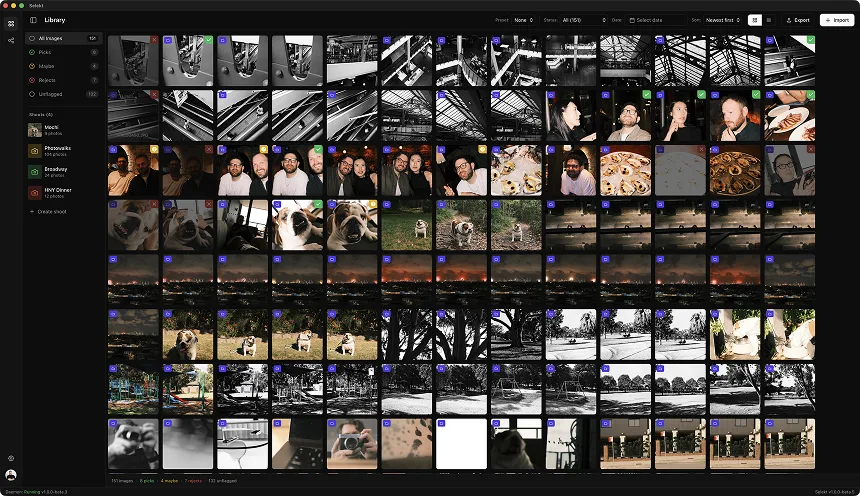
Selekt is a human-first culling tool. You import your images, organize them into scenes, compare shots side-by-side, and pick the winners yourself. The app's job is to make this process as fast and frictionless as possible through instant previews, keyboard shortcuts, and smart grouping — not to make decisions for you.

Neither approach is objectively better. They optimise for different things. Aftershoot optimises for minimum human attention. Selekt optimises for maximum human control with minimum friction. Your preference depends on how you think about culling.

Where Aftershoot genuinely wins

Let's start with what Aftershoot does better than Selekt. Honesty matters here.

AI auto-culling. Aftershoot's core feature is something Selekt doesn't even attempt. If you want a tool that makes culling decisions for you, Aftershoot delivers. Their AI detects duplicates, flags blinks and blur, identifies the sharpest frame in a burst, and surfaces what it considers the strongest compositions. For photographers who view culling as tedious grunt work to minimise rather than a creative step to engage with, this is genuinely valuable.

Personalized learning. Aftershoot claims to learn from your culling corrections over time. The more you use it, the more it adapts to your preferences. Selekt doesn't do this because Selekt doesn't make selections — you do.

AI editing presets. Aftershoot includes AI-powered editing that applies colour grading and adjustments based on the image content. This extends beyond culling into the editing phase. Selekt is purely a culling tool; editing happens in Lightroom, Capture One, or your editor of choice.

Pure volume handling. If you shoot 15,000+ frames per event and your primary goal is reducing that to a reviewable subset with minimal personal involvement, Aftershoot's fully automated first pass is faster than any human workflow. You're not evaluating images — you're reviewing the AI's homework.

Where Aftershoot falls short

Now the other side.

The 90% problem. Aftershoot reports roughly 90% agreement with manual selections. That sounds impressive until you do the math. On a 2,000-image wedding, 90% agreement means 200 images where the AI disagrees with your judgment. And here's the catch: those 200 images aren't random. They're disproportionately the edge cases — the slightly soft moment that's emotionally perfect, the unconventional composition that tells the story, the intentionally dark frame that sets a mood. The AI penalises anything that deviates from technical perfection.

So you still need to review the entire set to catch what the AI missed or wrongly rejected. The question becomes: is reviewing AI decisions faster than making decisions yourself? For many photographers, it isn't. Second-guessing an algorithm creates cognitive overhead that straightforward selection doesn't.

Desktop only. Aftershoot runs on Mac and Windows. No mobile apps. If you want to review selects on your iPad between shoots or make quick picks on your phone while traveling, you can't. Selekt runs on macOS and Windows today, with iOS and Android apps coming soon.

Electron-based, resource heavy. Aftershoot is built on Electron, which means it bundles a full Chromium browser engine. On large imports (3,000+ images), you feel it. Memory usage climbs, scrolling gets sluggish, and laptop fans spin up. Selekt uses Tauri with a Rust core — smaller footprint, lower memory, noticeably smoother on the same hardware.

Pricing. Aftershoot's full suite costs up to $480/year. Their basic culling plan starts lower, but to get the AI editing features they promote, you're paying significantly more than Selekt's $8/month. Over five years, that's well over $1,500 in difference. For solo photographers watching margins, that matters.

Offline limitations. Aftershoot's AI processing requires cloud connectivity for some features. Selekt works fully offline — useful for location shoots without reliable internet or photographers who prefer keeping client images entirely local.

Where Selekt genuinely wins

Scene-based organisation. Selekt's core innovation is treating culling as a scene-by-scene task rather than a flat grid of thousands of images. You group shots into logical scenes — the ceremony, the first dance, the portraits — and then compare within each group. This matches how photographers actually think about shoots and makes the culling decision clearer: which of these 8 frames of the first kiss is the winner?

Side-by-side comparison. Within a scene, you can compare images directly. Not flicking between thumbnails trying to remember what you just saw, but actual side-by-side evaluation. For selecting between similar frames, this is dramatically faster and more accurate.

Keyboard-driven speed. P to pick, X to reject, U to undo, arrow keys to navigate, auto-advance to the next image. Once you're in flow, culling becomes almost musical — rhythm, not friction. Selekt is built for photographers who want to move fast while staying in control.

Cross-platform. Selekt runs on macOS and Windows today, with iOS and Android apps coming soon. The plan: start culling on your desktop, then continue on your iPad or review on your phone once the mobile apps land, with your selections syncing across devices. Aftershoot is desktop-only.

Lightweight performance. Tauri + Rust means Selekt uses a fraction of the memory and CPU that Electron apps require. On an M-series Mac or a capable Windows laptop, scrolling 5,000 images is smooth. No Chromium tax.

Price. $8/month for Pro, with a free tier that includes unlimited culling — only AI tagging and cloud sync are reserved for Pro. Aftershoot's entry point is higher and scales up quickly if you want full features.

Honest philosophy. Selekt doesn't pretend AI will replace your creative judgment. It accepts that you're the expert on your own work and focuses entirely on removing friction from the mechanical parts of culling. Some photographers find this refreshing in a market saturated with AI promises.

Where Selekt falls short

Fair is fair. Here's what Selekt doesn't do.

No auto-culling. If you want AI to make the first pass, Selekt isn't the tool. You will see and decide on every image yourself. For photographers who genuinely don't want that involvement, this is a dealbreaker.

No AI editing. Selekt is a culler, not an editor. Your editing workflow happens downstream in Lightroom, Capture One, Photoshop, or whatever you use. If you want culling and editing in one AI-powered package, Aftershoot offers that.

No personalized learning. Selekt doesn't learn your preferences because Selekt doesn't make selections. Every session starts fresh with you in full control. Some photographers want a tool that adapts to them over time; Selekt doesn't claim to.

Newer to market. Aftershoot has been around longer and has more user reviews, case studies, and community discussion. Selekt is newer. If you weight social proof heavily in your tool decisions, Aftershoot has more of it right now.

The real question: how do you think about culling?

The choice between Aftershoot and Selekt ultimately comes down to a philosophical question: do you view culling as a task to minimise or a creative step to engage with?

Choose Aftershoot if:

  • You shoot extremely high volume (10,000+ frames regularly) and want AI to handle the first pass
  • You view culling as tedious work to be automated away
  • You trust AI to learn your preferences over time
  • You want culling and editing bundled in one tool
  • You're comfortable paying $200-480/year for full features
  • Desktop-only is fine for your workflow

Choose Selekt if:

  • You want to see and decide on every image yourself
  • You find culling a valuable creative step, not just overhead
  • Scene-based organisation matches how you think about shoots
  • A desktop-now, mobile-soon roadmap (iOS and Android apps coming) matters to you
  • You prefer lightweight, fast software over feature-heavy apps
  • $8/month vs $480/year is a meaningful difference for your business

There's no wrong answer. They're different tools for different mindsets.

The workflow question

Some photographers ask: can I use both? In theory, yes — you could use Aftershoot for the AI first pass and then bring selects into Selekt for scene organisation and final picks. In practice, this adds complexity and cost. Most photographers settle on one tool that matches their philosophy and stick with it.

The more useful question is: what does your current workflow look like, and where's the actual bottleneck?

If your bottleneck is sheer volume — you're drowning in images and need help just getting them to a manageable number — Aftershoot's auto-culling might genuinely help.

If your bottleneck is decision quality — you're spending time second-guessing yourself, losing context between similar shots, struggling to compare options — Selekt's scene-based grouping and side-by-side comparison might help more.

If your bottleneck is friction and speed — the mechanical overhead of flagging images, navigating between shots, exporting your picks — both tools address this, but Selekt's keyboard-driven approach is specifically optimised for it.

Try both

Both Aftershoot and Selekt offer ways to try before you commit. Aftershoot has a free trial. Selekt has a free tier with unlimited culling and no time limits — only AI tagging and cloud sync are paid.

The best way to decide is to import the same set of images into both and see which one matches how your brain works. Do you want AI making decisions and you reviewing them? Or do you want a fast, organised system where every decision is yours?

Neither answer is wrong. But one of them is right for you.

Download Selekt at selekt.photos. Give Aftershoot a look at aftershoot.com. Make an informed choice.

Ready to speed up your culling?

Selekt is a free photo culling app for macOS & Windows with keyboard shortcuts, AI tagging, and Lightroom export.

Download free