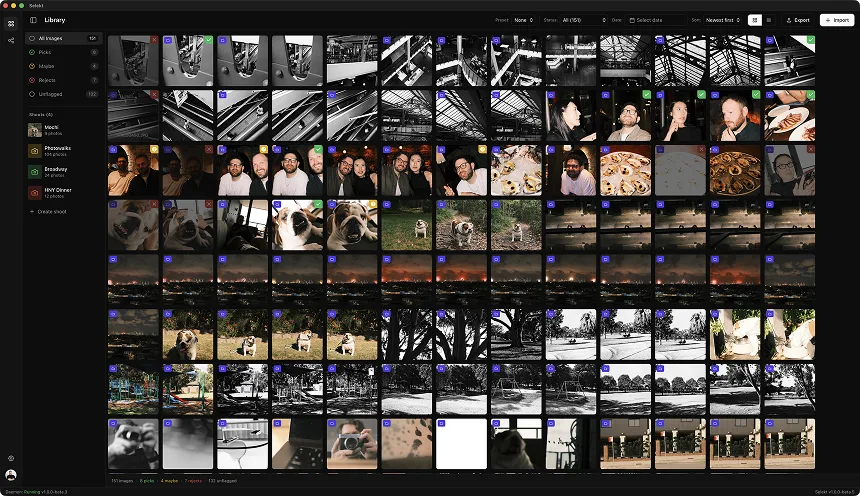
You just got back from two weeks in Japan. Or a road trip through Portugal. Or a month backpacking Southeast Asia. Your memory cards hold 3,000+ images - maybe 5,000 if you were trigger-happy - and somewhere in that pile are the photos that actually capture what the trip felt like.
But right now, exhausted from travel and facing thousands of thumbnails, the thought of culling fills you with dread. So you import everything, promise yourself you'll organize it later, and three years from now those photos are still sitting unculled in a folder labeled 'Japan 2026 TO SORT.'
Travel photography culling is uniquely challenging because you're not a professional with a shot list - you're documenting an experience, and everything feels meaningful when you're still emotionally attached. Here's how to actually get through it.
Why travel photography culling is so hard
Planning example: capture volume varies by person, trip, and shooting style.
Travel photos carry emotional weight that other genres don't:
Everything feels significant. That random street corner? You got lost there and found an amazing noodle shop. That blurry temple shot? It was raining and magical. Your memory fills in the gaps that the photograph doesn't capture.
You shot everything. Unlike a wedding photographer with a defined scope, you photographed food, architecture, landscapes, people, details, signs, sunsets, your travel companions, and seventeen variations of the same scenic overlook.
No clear "client" with requirements. There's no brief telling you to deliver 50 images. The only constraint is your own willingness to cull, which is why most people cull zero images and keep everything.
The volume is overwhelming. Two weeks of casual shooting easily produces 2,000-4,000 images. Facing that pile after traveling is exhausting.
Time decay of memory. The longer you wait to cull, the less you remember about why you took each shot. But you also have less emotional attachment, which can actually help objectivity.
The good news: travel photography culling doesn't need to be perfect. You're not delivering to a client. You're creating a personal archive that's actually usable, and maybe a shareable set that tells the story of your trip.
Step 1: quarantine the obvious junk
Illustrative first-pass exercise, not a measured benchmark.
Before you start any real evaluation, do a fast pass to eliminate the obvious trash. This alone can cut your pile by 20-40%:
Immediate deletes:
- Completely blurry/out of focus (not artistic blur - failed focus)
- Accidental shots (pocket shots, ground shots, camera testing)
- Severely over/underexposed with no recoverable detail
- Screenshots and reference photos you no longer need
- Duplicates from burst mode where you clearly only need one
- "I'll remember what this is" shots that you no longer remember
- Backs of heads, blocked views, tour group crowds ruining the frame
Speed matters here. Don't evaluate - just delete the obvious failures. 1-2 seconds per image max. If you hesitate, skip it and move on.
The test: Would you ever, under any circumstances, want this specific image? Not the scene - this image. If the answer is no, delete it.
This pass should take 15-30 minutes for a 3,000-image trip. Don't overthink it. You're just taking out the trash.
Step 2: organize by location and day
Now organize what's left by location and day. This transforms an overwhelming pile into manageable chunks:
Group by destination: Tokyo, Kyoto, Osaka become separate culling projects. A road trip becomes 10-15 location groups. Each location is its own culling session.
Time-based scene detection helps: Your camera's timestamps create natural groupings. That 3-hour gap between shooting in the morning market and the afternoon temple? Those are different scenes, different culling contexts.
Day structure within locations:
- Morning (golden hour, fresh energy, usually best light)
- Midday (harsh light, often more documentary/tourist shots)
- Evening (magic hour, dinner, nightlife)
Why organization matters: Culling 300 images from "Day 2 in Lisbon" is manageable. Culling 3,000 images from "Portugal" is paralyzing. Break it down.
Create a rough shot inventory:
- How many images per location?
- Which days/locations have the most volume?
- Any obvious highlights (major landmarks, special experiences)?
This inventory helps you plan your culling sessions and sets expectations for how many keepers you might want from each segment.
Step 3: identify your story anchors
Before evaluating individual images, identify the story anchors - the moments and subjects that define the trip:
Story anchors might be:
- Major landmarks or sights (the thing you traveled to see)
- Unexpected discoveries (the hidden garden, the random festival)
- Local experiences (markets, food, transportation, daily life)
- Human moments (travel companions, locals you met, candid scenes)
- Atmosphere and mood (weather, light, the feeling of a place)
The narrative question: If you were telling someone about this trip, what would you describe? Those descriptions point to your story anchors.
Anchor coverage check: For each anchor, do you have images that capture it? If the best meal of the trip has zero good photos, that's a gap in your visual story. If you shot 400 images of one temple and 10 images of a life-changing conversation, your photo distribution doesn't match your memory of significance.
This isn't about being systematic - it's about having some framework beyond "I'll keep whatever looks nice." Your story anchors guide which images matter most.
Step 4: the three-pile cull
For each location/day segment, sort images into three piles:
Pile 1: Definite Keepers (⭐) Images you'd actually use - share on social media, print, put in an album, show people. These need to be good photographs, not just good memories.
Criteria:
- Technically solid (focus, exposure, composition)
- Tells a story or captures a moment clearly
- Stands alone without explanation
- Makes you feel something when you look at it
- You'd be happy to show this to someone who wasn't there
Pile 2: Archive Worthy (✓) Images that document something meaningful but aren't showcase quality. The photo of your travel companion isn't a great photo, but you want to keep it. The shot of the menu where you ordered that amazing dish. The mediocre landscape that shows where you stayed.
Criteria:
- Documents something you want to remember
- You won't share it, but you'd be sad to lose it
- Has personal significance even if not technical quality
Pile 3: Reject (✗) Everything else. Similar shots where another version is better. Technically flawed images of things you have better shots of. Photos where the memory is more meaningful than the image itself.
The hard truth: Most travel photos are Pile 3. And that's fine. The goal isn't to save everything - it's to save the images worth saving.
Step 5: compare similar shots ruthlessly
This is where most travel culling stalls. You shot 15 variations of the Eiffel Tower / that temple / that beach sunset. You need to pick 1-3.
Side-by-side comparison method:
- Group all similar images (same subject, same session)
- Compare #1 vs #2 - which is better? Keep the winner.
- Compare winner vs #3. Keep the winner.
- Continue until you've compared all images against the current best.
- Your final winner goes in Pile 1. Everything else goes to Pile 3.
What makes one version better:
- Better light (cloud position, sun angle, golden vs harsh)
- Better composition (cleaner frame, better foreground, no distracting elements)
- Better moment (if there's action or people, which frame has the best gesture/position)
- Better technical quality (sharper focus, better exposure)
Allow exceptions for genuinely different shots: A wide establishing shot and a tight detail shot of the same location aren't duplicates - they tell different stories. Keep both if both are strong.
The "which would I print?" test: If you could only print one image of this scene, which would it be? That's your keeper. The others are redundant.
Be brutal. You do not need 8 versions of the same sunset. You need one good one.
Step 6: evaluate by story, not just quality
Technical quality matters, but story matters more. A slightly soft image that captures a genuine moment beats a tack-sharp image of nothing happening.
Story-driven evaluation questions:
- Does this image tell you something about the place or experience?
- Could someone who wasn't there understand what's happening?
- Does it evoke the feeling of being there?
- Does it add something to the overall trip narrative, or is it redundant?
Types of travel images that tell stories:
- Establishing shots: Wide views that show where you were, the scale, the environment
- Detail shots: Close-ups that reveal texture, craft, local character
- Moment shots: People doing things, interactions, gestures, expressions
- Atmospheric shots: Weather, light, mood, the feeling of a place
- Personal shots: Your travel companions, your own experience, behind-the-scenes
A complete travel story needs variety: Don't keep only landscapes or only food photos. A good travel set has range - wide and tight, places and people, planned and spontaneous.
The social media test: If you were going to post 10 images from this trip to Instagram, which would they be? Those are likely your Pile 1 core. Everything else supports or supplements them.
Handling specific travel photo challenges
The landmark problem: You shot 50 images of a famous landmark that millions of people have photographed. Unless your shot is genuinely unique (unusual angle, incredible light, meaningful moment), keep only 1-2 for documentation and accept that this isn't where your unique trip story lives.
The "I shot this for reference" problem: Maps, signs, museum labels, restaurant menus - these were useful during the trip but are probably not worth permanent storage. Evaluate honestly: will you ever look at this photo of an informational plaque again?
The travel companion problem: You want photos of the people you traveled with, but most are unflattering snapshots. Keep the genuine moments where they look happy and present, not the awkward poses in front of every landmark.
The food photography problem: You photographed every meal. Most look mediocre under restaurant lighting with a phone/camera held awkwardly over the table. Keep only the ones where the food actually looks appetizing and the context is interesting.
The "magic hour wasn't magic" problem: You stayed for sunset but the light was mediocre. Keep maybe one documentary shot, but don't convince yourself there's a keeper just because you made the effort.
The cultural sensitivity issue: Photos of people, religious sites, or ceremonies - consider whether these are appropriate to keep and share, regardless of technical quality. When in doubt, err toward privacy.
Delivery benchmarks for travel
Illustrative targets only: choose counts and time boxes that suit the trip and intended output.
Travel photography doesn't have "clients," but these benchmarks help set expectations:
| Trip Length | Typical Shots | Pile 1 Target | Archive Target | Cull Time |
|---|---|---|---|---|
| Weekend (2-3 days) | 300-600 | 30-50 | 75-100 | 1-2 hours |
| Week trip | 800-1500 | 60-100 | 150-250 | 2-4 hours |
| Two weeks | 1500-3000 | 100-150 | 300-500 | 4-6 hours |
| Month+ | 3000-6000 | 150-250 | 500-800 | 6-10 hours |
Per-location targets:
- Major destination (3+ days): 20-40 Pile 1 keepers
- Day trip location: 10-20 Pile 1 keepers
- Pass-through location: 3-8 Pile 1 keepers
Social sharing math:
- Instagram trip highlight: 10-15 images (carousel posts)
- Photo album/book: 50-100 images
- "Show the family" slideshow: 30-50 images
- Full personal archive: All of Pile 1 + Pile 2
The 5% rule of thumb: For casual travel shooting, roughly 5% of what you shot is worth keeping in Pile 1. 10-15% is archive worthy. The rest is redundant or failed.
If you're keeping significantly more than this, you're probably not being selective enough.
When to cull: the timing debate
Optional scheduling pattern, not a documented psychological rule.
Cull immediately (within a week):
- Memory is fresh - you remember why shots mattered
- Emotional high helps motivation
- Gets done before procrastination sets in
- Can share highlights while trip is still relevant
Wait 2-4 weeks:
- Emotional attachment fades, enabling objectivity
- You can see images as photographs, not memories
- Less likely to keep mediocre shots out of sentiment
- Distance reveals which moments actually mattered
The compromise approach:
- Day 1-3 post-trip: Quarantine obvious junk (Step 1). Quick, low-effort, clears trash.
- Week 1-2: Organize by location/day. Pull obvious Pile 1 favorites you're excited about.
- Week 3-4: Complete the full cull with fresh eyes. This is when you're ruthless about similar shots.
Whatever you do, don't wait months. The longer travel photos sit, the less likely you are to ever cull them. The memory fades but so does the motivation. Set a deadline and stick to it.
The 'good enough' archive
Perfect is the enemy of culled. Here's what 'good enough' looks like:
Good enough organization:
- Images sorted by trip, then by location
- Pile 1 keepers flagged or separated
- Obvious junk deleted
- You can find specific memories when you want them
You don't need:
- Keyword tags for every image
- Perfect folder hierarchies
- Color-coded ratings from 1-5
- Detailed captions and metadata
The real goal: When you want to find photos from that trip, you can. When you want to share the highlights, you know where they are. When you're feeling nostalgic, you have a curated set to look through, not an overwhelming pile.
Archive storage reality:
- Keep Pile 1 in your active photo library (what you'll see and share)
- Keep Pile 2 in a backup archive (preserved but not cluttering your main library)
- Delete Pile 3 with confidence (or move to a "probably delete" folder if you need the security blanket)
Done is better than perfect. A roughly-culled travel archive you actually look at beats a perfectly-organized collection you never get around to creating.
Common travel culling mistakes
Keeping everything "just in case." You're not going to need 47 versions of the same view. The "just in case" mentality leads to un-cullable archives. Be decisive.
Culling for someone else's taste. Keep what matters to you, not what you think would impress people on Instagram. Your personal archive is for you.
Letting technical quality override meaning. A blurry shot of your friend laughing at that incredible dinner might be worth more than a tack-sharp image of a generic street scene. Technical quality is a tiebreaker, not the primary criterion.
Not culling similar shots ruthlessly. This is the #1 time sink. 15 nearly-identical images of the same view means you're avoiding a decision. Make the decision.
Keeping "reference" photos as memories. A photo of the train schedule or the hostel name isn't a memory - it's information that's now useless. Evaluate whether you'll ever actually look at it again.
Using complexity as an excuse. "I'll set up a proper system and then cull." No you won't. The system doesn't matter. Sorting images into three piles matters. Start with what you have.
Waiting for the perfect time. There is no perfect time to cull 3,000 travel photos. There's only now or never. Pick now.
Speed techniques for travel culling
Optional pacing ideas, not performance guarantees.
Session-based culling: Don't try to cull an entire trip in one sitting. Cull one location or one day per session. 30-60 minutes, then take a break.
Fast first pass: Go through images quickly (1-2 seconds each) and flag anything that makes you stop. Don't evaluate - just notice what catches your eye. Your instincts are usually right.
The "pick 10" constraint: For any location, first pick your 10 favorite images without overthinking. Then evaluate whether anything else deserves to join them. This prevents the paralysis of comparing everything to everything.
Work in chronological order within locations: The narrative structure helps your brain process. Morning shots, midday shots, evening shots - you're re-experiencing the day in sequence.
Use keyboard shortcuts religiously: Arrow keys to navigate. One key to flag/star. One key to reject. Every mouse movement costs time.
Set a timer: "I'm going to cull Lisbon Day 1 in 20 minutes." Time pressure forces decisions. You can always make a second pass if needed.
The "delete view" trick: After flagging keepers, look at what you're deleting. If anything in the reject pile makes you uncomfortable deleting, rescue it. Everything else goes.
Accept imperfect decisions: You will occasionally delete a shot and later wish you hadn't. That's fine. The alternative - keeping everything - is worse.