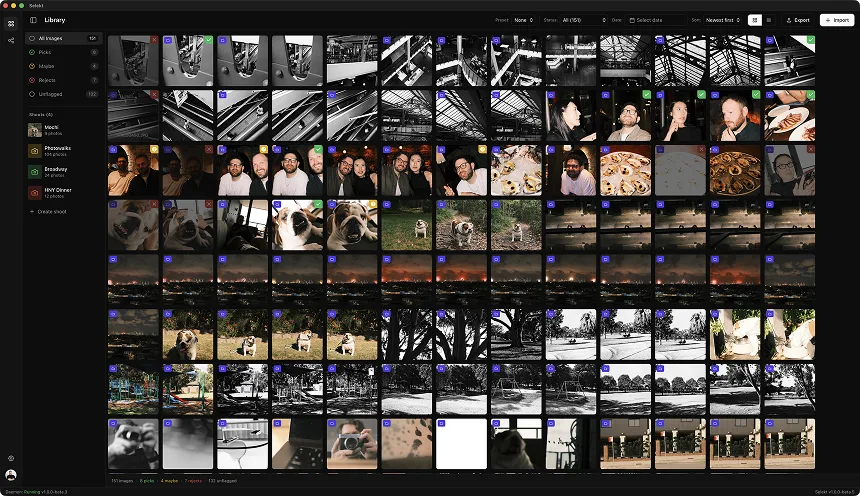
This is an illustrative workflow, not a measured benchmark. The times below are examples to adapt to your cards, computer, and style.
You shot the wedding. Twelve hours on your feet, two bodies firing, a second shooter covering the other side of the room. Now you're home at midnight with four memory cards and somewhere between 2,500 and 4,000 images sitting on them. The couple is already asking for sneak peeks. This is the part of wedding photography nobody romanticizes: the cull. Getting from 3,000+ raw frames down to a 400-800 image gallery without losing the moments that matter depends more on a system than on raw speed. This post walks through a three-pass system step by step, with example times you can compare against your own.
Step 1: Card dump and backup (15 minutes)
Backup workflow example: transfer time depends on media, reader, file sizes, and verification.
Before you touch a single image, get the files off your cards and backed up. This is non-negotiable. Dual card body shooters: you've got redundant copies on your CF Express and SD cards already, but that only protects you until you format. The workflow is simple. Dump all cards to a single folder on your fastest drive (an NVMe SSD if you have one), because you'll be reading these files thousands of times during the cull and edit. Name the folder with the date and couple name: 2026-02-08_Johnson-Wedding. While the first card copies, start a backup to a second drive or NAS. Some photographers use a verified copy tool like Hedge or ChronoSync that checksums every file. Others just run a straight rsync. The point is: two copies on two physical drives before you do anything else. If you're running a dual card body like the R5 or Z8, dump both card slots but keep only one set as your working files. The second card is your insurance policy: label it and put it in a case. Don't format your cards until the final gallery is delivered. Total time: about 15 minutes for 3,000 images on a USB 3.2 reader. Use the transfer time to eat something. You just worked a 12-hour day.
Step 2: Ingest and organize (5 minutes)
Workflow example: RAW+JPEG use and pairing behaviour vary by photographer, camera, and application.
Open your culling tool and point it at the dump folder. If you're shooting RAW+JPEG (and most wedding shooters do for the faster autofocus and backup), a good culling tool will automatically pair those files so you see one entry per shot instead of 6,000 thumbnails for 3,000 captures. Selekt can keep RAW and JPEG versions of a capture together as one photo when you import, so you review the JPEG for speed and, once you have processed the RAW, press R to compare the two. Before you start culling, sort by capture time. This is critical for wedding work because the day has a narrative arc: prep, ceremony, family formals, couple portraits, reception, dancing. Sorting chronologically means you're mentally following the day as you cull, which helps you remember moments and make faster decisions. If you had a second shooter, their images will interleave with yours by timestamp, which is exactly what you want: you'll see every angle of each moment together. Some photographers separate first and second shooter files. Don't. Interleaved by time is faster to cull because you're evaluating each moment holistically.
Step 3: First pass - reject the obvious (20-25 minutes)
Illustrative first-pass targets, not measured norms.
This is the pass that saves you the most time, and it should also be your fastest. You're not looking for great images here. You're looking for images that are clearly not usable: misfires, motion blur from walking between setups, backs of heads, test exposures, duplicate bursts where you held the shutter too long, and the 47 shots of the empty dance floor you took while testing your flash settings. The pace target is 1-2 seconds per image. You're making gut decisions. Keystroke: X for reject, right arrow to advance. In Selekt's library view, auto-advance is on by default: hit X and you're already looking at the next frame. No mouse, no clicking, no menus. Just X-X-X-right-right-X-X at speed. Don't zoom in. Don't evaluate sharpness at 100%. Don't agonize over whether the slightly soft one is "soft enough" to reject. If it's clearly a miss, kill it. If there's any doubt, leave it for Pass 2. For a 3,000-image wedding, this pass typically takes 20-25 minutes and eliminates 40-50% of your frames. You'll come out the other side with roughly 1,500-1,800 survivors. The emotional discipline here is important: wedding photographers often hesitate to reject images because "what if that's the only frame of that moment?" Trust the process. You fired 3,000 frames in 12 hours. You have coverage. The obviously bad frames are obviously bad for a reason.
Step 4: Second pass - pick your selects (20-25 minutes)
Illustrative selection ranges, not industry standards.
Now you're working with 1,500-1,800 images that all passed basic quality. This is where the creative culling happens. You're looking for the images you'd be proud to deliver: the moments that tell the story, the expressions that make you feel something, the compositions that showcase your style. Keystroke: P for pick. Move at 2-3 seconds per image. You can afford to be slightly more deliberate here because you're looking at fewer frames and making a more nuanced judgment. This is also where wedding culling diverges from every other genre. In portrait or commercial work, you're evaluating technical execution. In wedding work, you're evaluating moments. The slightly soft image of the bride's dad seeing her for the first time will always beat a tack-sharp image of him standing around looking normal. Emotion over technique, every single time. Watch for these specifically: first looks and genuine reactions, the moment right before and right after the obvious shot (the groom wiping his eyes before he composes himself, the couple laughing after the posed kiss), candid interactions between guests, detail shots that set the scene, and the in-between moments that documentary photographers live for. Your target pick count is 600-900, roughly 20-25% of the original shoot. This gives you headroom for the refine pass. If you're picking more than 30%, you're not being selective enough. If you're under 15%, you might be too aggressive, so second-guess a few rejects.
Step 5: Refine and sequence (10-15 minutes)
Illustrative delivery ranges, not universal client expectations.
You've got 600-900 picks. Your delivery target is 400-800 (adjust this to the count your package promises). The refine pass is about two things: eliminating redundancy and checking your picks hold up on a second look. Go through your picks only and hide everything else. Now you'll notice sequences where you picked three similar frames. Compare them side by side and keep the strongest one. Look for: the best expression in a group shot series, the cleanest background in a portrait set, and the tightest moment in a candid sequence. This is also where you zoom in selectively. That emotional first-look shot you picked at speed? Check focus on the eyes. If it's genuinely soft (not artistically soft, but missed-focus soft), check whether you have a sharper frame from the same moment. Usually you do. Pay attention to the overall sequence. A great wedding gallery has rhythm: wide establishing shots, medium moments, tight details, repeated through each phase of the day. If you notice you picked 40 ceremony shots and 5 reception shots, go back to the reception and see if you were too aggressive. After the refine pass, you should be in your delivery range. The final count varies by photographer and package: some deliver 400, some deliver 800. The key is that every single image in the final set earns its place.
Step 6: Export to Lightroom (5 minutes)
Once the cull is complete, test the handoff to the actual editor with a small representative set. Confirm whether the current export uses copied files, metadata, or XMP sidecars; whether ratings, flags, and colour labels arrive as expected; and how RAW+JPEG pairs are handled. Keep the originals backed up and compare the selected count in both applications before processing the full wedding. Do not assume every flag or scene maps identically across tools.
The pain points nobody talks about
Workflow cautions, not claims about every studio or camera configuration.
Wedding culling has specific headaches that studio and portrait photographers never deal with. Dual card bodies mean you might have slight exposure or white balance differences between slots if one card is shooting RAW and the other RAW+JPEG. Mixed camera bodies are even worse. If you shot the ceremony on a Canon R5 and your second shooter used an R6 II, the color science is slightly different and your eye has to constantly adjust while culling. Multi-format shoots add another layer. If your second shooter hands you CF Express cards and SD cards, or worse, they shot JPEG-only to save space on a smaller card, you're dealing with mixed quality and mixed file types in the same timeline. The emotional weight is real too. You're culling someone's wedding day. The anxiety of "what if I reject the only frame of her grandmother dancing" is legitimate. This is why a systematic multi-pass approach matters so much: you see every image at least twice before it's eliminated, and your reject pass is only removing the genuinely unusable frames, not making subjective calls about moments. The other thing nobody mentions: culling a wedding is mentally exhausting in a way that culling a portrait session isn't. You're processing 3,000 decisions while emotionally engaging with moments that genuinely matter to real people. Do your cull the next day after real sleep, not at midnight after the reception. Your decisions will be better.
Putting it all together: an example timeline
Illustrative schedule only: measure the complete workflow on your own jobs.
Here's the example timeline for a 3,000-image wedding cull:
- Card dump and backup: 15 minutes
- Ingest and organize: 5 minutes
- Pass 1 (rejects): 20-25 minutes
- Pass 2 (picks): 20-25 minutes
- Pass 3 (refine): 10-15 minutes
- XMP export to Lightroom: 5 minutes
Total: 75-90 minutes from cards to Lightroom-ready selects. With practice and a consistent workflow, the active culling time (passes 1-3) compresses to about 50-60 minutes. The rest is mechanical file handling. The key enablers are single-keystroke ratings with auto-advance (so you never break rhythm), fast image loading (so you're never waiting on renders), and chronological sorting (so your brain follows the story instead of jumping around). If your wedding culls currently take most of an evening, the fix usually isn't working faster; it's working more systematically. Set up your passes, trust your instincts on the first pass, and save the deliberation for the refine stage where it actually matters. Every minute you save culling is a minute you can spend editing, delivering sooner, or just recovering from a 12-hour wedding day. Your Monday self will thank your Sunday self for having a system.